Connected Contact Center AI & Omnichannel Experiences at Scale
Optimize operations and elevate agent productivity with advanced AI and omnichannel contact center solutions. Built for mid-market and enterprise needs — available for cloud or on-premise environments.
Unified AI-Powered Omnichannel Workspace for High-Performance
Don't let fragmented applications slow down your front line. Our unified agent workspace integrates all channels and interactions into a single, continuous customer journey.
Agent Workspace
Eliminates cognitive overload and app switching by integrating business and CRM systems, Interaction Activity and History, and productivity tools into a single, intuitive workspace.
Supervisor Desktop
Provides real-time queue visibility, smart tools, team messaging, and instant cross-channel workload management.
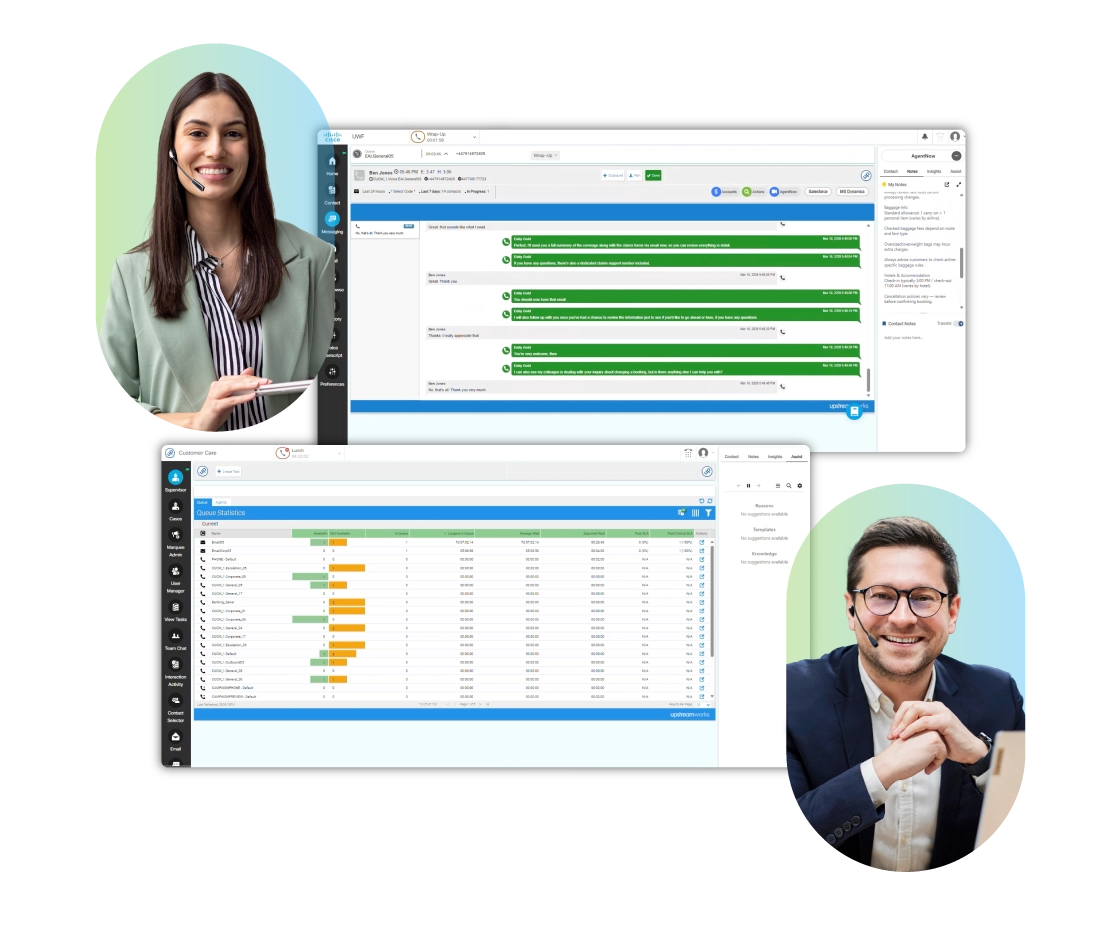
- Handle voice and digital channels in one workspace
- Full interaction context and visibility across channels
- AI-powered agent guidance and insights in real-time
- Tailored integrations with business systems and CRMs
- Simplified management with real-time data

Deliver Smarter, Faster Resolutions with AI Agent Assist
Upstream Works AI Agent Assist delivers automated contextual guidance and insights directly within the agent desktop, empowering enterprise contact centers to improve agent productivity, Average Handle Time (AHT), First Contact Resolution (FCR) and customer satisfaction (CSAT).
Enable human-AI engagements without disrupting agent workflows — and provide efficient resolutions across channels.
- Customer intent detection
- Customer and agent sentiment analysis
- Conversation summaries
- Real-time transcriptions and translations
- Knowledge recommendations
AgentNow: Instant On-Demand Support — Anytime, Anywhere
Meet your customers exactly where they are. Upstream Works AgentNow enables seamless conversations across live video, voice and chat — via QR codes, weblinks or purpose-built kiosks — for face-to-face, personalized engagements.
Provide instant access to customer support by leveraging remote agents across your organization to support in-person staff during time-sensitive moments and peak periods.
Fast & Easy Access

Connect using QR codes, weblinks and kiosks, no apps or downloads required.
Personalized Resolutions

Seamless CX across video, voice and chat, with transcriptions and AI Assist.
Optimize Resources

Leverage remote agents across your business during high-stakes moments.
AI-Enabled Contextual Knowledge at Your Agent's Fingertips
Upstream Works Assist Knowledge Management makes it easy to collect, manage and share knowledge across the enterprise contact center, so customers get accurate, consistent information and faster resolutions on any channel.
Integrated directly into the Upstream Works desktop, Assist Knowledge helps organizations improve agent productivity, accelerate onboarding, reduce training time and deliver more consistent customer experiences.
- Contextual knowledge and decision tree visualizations
- Contact center AI, NLP and super fast search capabilities
- Collaboration and built-in feedback loop
- Seamless desktop integration and real-time AI guidance
- Customer Assist provides a self-service FAQ knowledge portal


Turn Your Data into Meaningful Improvements with Advanced Analytics & Reporting
Upstream Works Advanced Analytics and Reporting delivers deep omnichannel insights through real-time and historical dashboards and customizable visualizations, enabling informed data-driven decision-making.
Role-based dashboards and rich data visualizations offer easy-to-view key metrics and trends across customer experience, agent performance and operational efficiency.
Interactive dashboards make it easy to spot issues, track progress and take timely action. Whether monitoring live performance or reviewing historical data, you'll gain the insights needed to drive meaningful improvements.
Explore Advanced Analytics & ReportingEnterprise Contact Center Solutions on the Platform of Your Choice
Upstream Works extends Amazon Connect, Cisco Finesse and Webex Contact Center. We also offer a standalone Digital CX Solution. Maximize your technology investments, enhance your capabilities and accelerate transformation.
Frequently Asked Questions (FAQs)
About Upstream Works Products
What products does Upstream Works offer?
Upstream Works offers a suite of contact center solutions, featuring a unified Agent Workspace, Supervisor Desktop, AI Agent Assist for real-time guidance, Assist Knowledge Management, AgentNow for instant video CX, integrations with business systems and CRMs, and Advanced Analytics and Reporting. Our products are available on the platform of your choice, including Amazon Connect, Cisco Finesse, Webex Contact Center, and our Digital CX solutions.
Is Upstream Works suitable for enterprise contact centers?
Yes. Upstream Works serves mid-market and enterprise contact centers. Our solutions are enterprise-ready, reliable, scalable and secure for on-premise and cloud environments.
Which platforms does Upstream Works support?
Upstream Works supports Amazon Connect, Cisco Finesse and Webex Contact Center. We also have a standalone Digital CX solution.
What does AI Agent Assist do?
AI Agent Assist gives agents real-time guidance and insights during live customer interactions, including automated sentiment, intent detection, live transcription, and conversation summaries, improving productivity, reducing average handle time (AHT) and increasing customer satisfaction (CSAT).
What is AgentNow?
Upstream Works AgentNow enables seamless video, voice and chat conversations launched from QR codes, weblinks and kiosks. It's a high-touch customer experience solution that enables seamless conversations and delivers human-AI service during high-demand and peak moments.
Transform with Contact Center
AI & Omnichannel Solutions
Explore how Upstream Works products improve Average Handle Time (AHT), streamline agent workflows, and enable human-AI engagements across channels.