Totalix™ edition
Totalix™ Mobile
The agent workspace on a phone for mobile, field and remote teams — plus a Mobile SDK that puts chat, messaging and video inside your own customer apps.
Who is Totalix Mobile for?
Totalix Mobile is for mobile contact center agents, field service teams and remote relationship managers — and any customer-facing app that should offer chat, messaging or video. The agent workspace on a phone for mobile, field and remote teams — plus a Mobile SDK that puts chat, messaging and video inside your own customer apps. Early adopters from November 2026; generally available 1 December 2026.
- Mobile agent app: contact center agents, field service and relationship managers on the move
- The full functionality of a contact center agent on a tablet or phone — coming to the Apple App Store and Google Play
- Mobile SDK: chat, messaging and video inside your customer-facing apps
- Same conversation timeline, context and knowledge as the desktop
Totalix™ Mobile has two sides. For your people, it is the full agent workspace on a phone or tablet: contact center agents working away from a desk, field service technicians, branch and store staff, drivers, clinicians and remote relationship managers all get the same conversation timeline, context, knowledge and AI assistance as the contact center. In 2018, Emergence Capital estimated that only about 1% of venture investment went to companies building technology for the world’s 2.7 billion deskless workers.
For your customers, the Totalix Mobile SDK puts chat, messaging, video and the rest of the platform’s engagement features inside the apps you already ship, so a customer can start a conversation in your app and your team picks it up with full context.
Transcript of the Totalix Mobile demo film (2:42)
Introducing Totalix Mobile: the power of a complete contact center agent desktop, purpose-built for mobile, delivering a fully optimized, intuitive experience without compromising on capability or functionality.
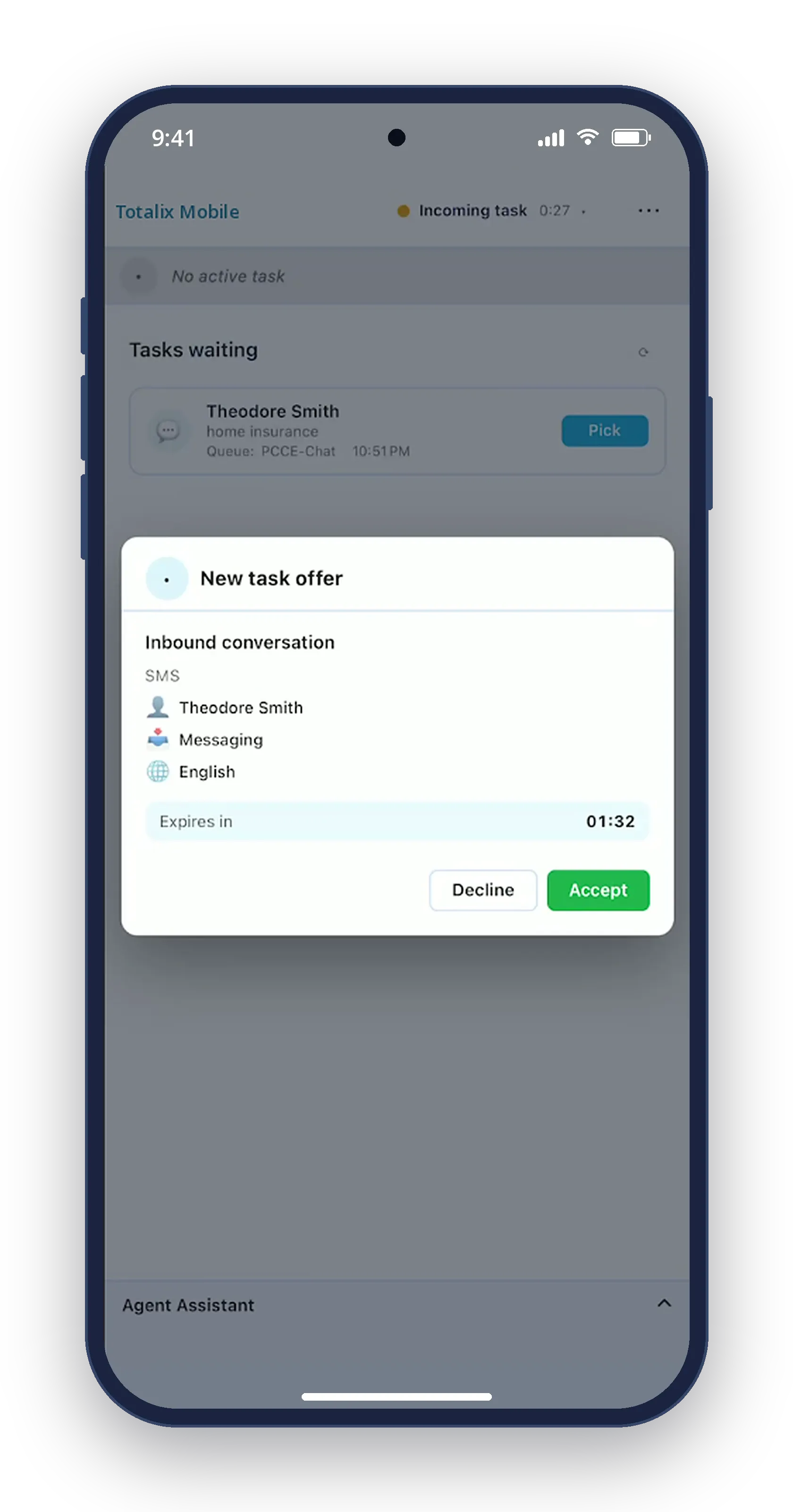
Incoming customer interactions are presented clearly, with easy-to-see notifications that allow agents to identify and respond to new tasks quickly and effortlessly. And with interaction history just a scroll away, agents can follow previous customer conversations, understand the wider customer journey, and provide a more informed, personalized experience.
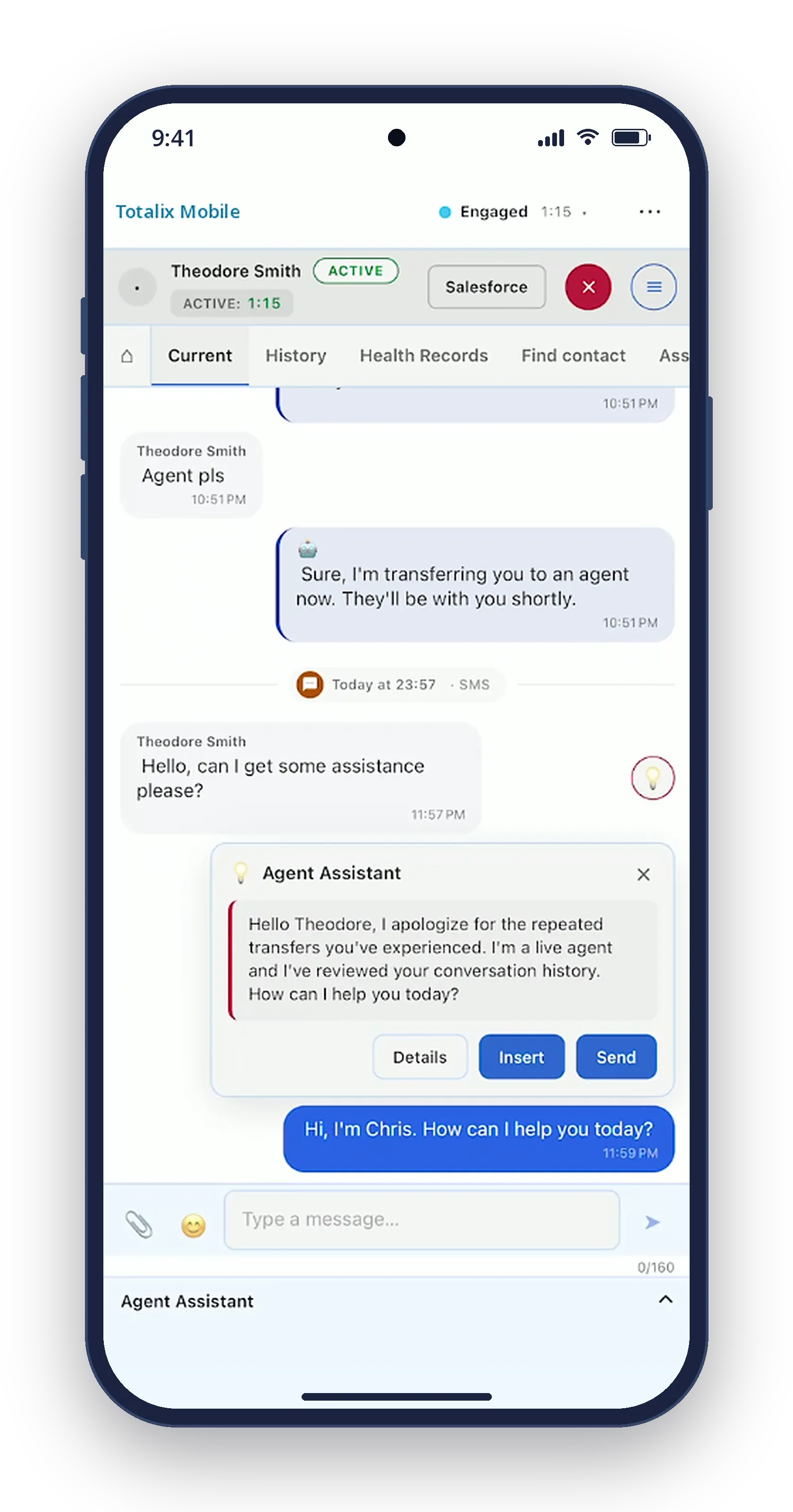
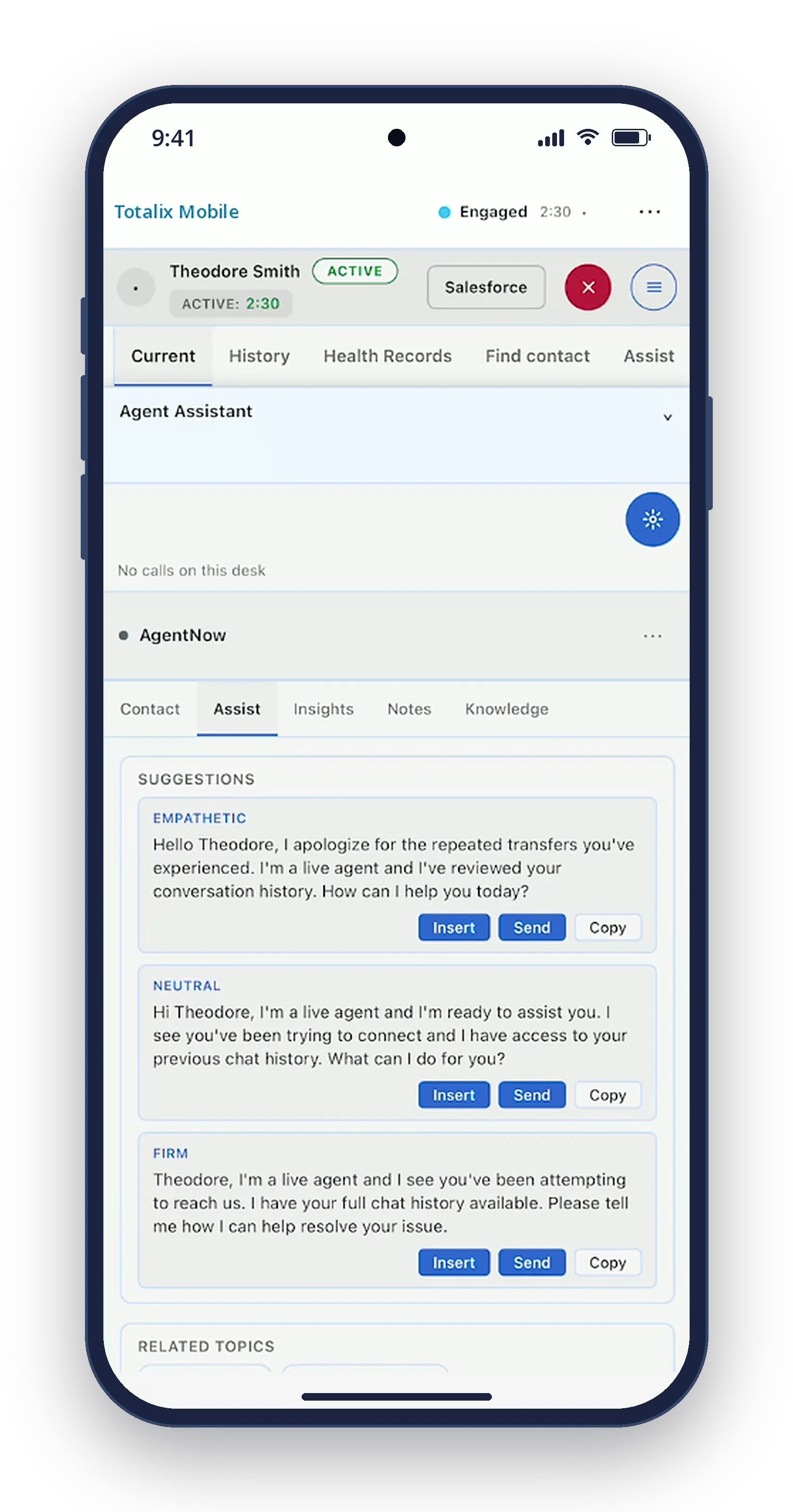
Intelligent suggested responses provide guidance directly within the conversation, helping agents respond with greater confidence and consistency while reducing the effort involved in everyday customer interactions. Every element has been carefully designed for the smaller screen, ensuring that even complex customer conversations remain simple to manage, with the same familiar capabilities agents expect from a full contact center desktop.
With an integrated WebRTC softphone, agents can handle voice calls directly within Totalix Mobile without relying on a separate calling application. UW Knowledge & Assist provides relevant suggested responses, guiding agents naturally through each customer conversation, with real-time transcription alongside.
And when a more personal interaction is needed, AgentNow brings video engagement directly into Totalix Mobile, extending the agent experience beyond traditional communication channels. Agents can connect with customers face-to-face, delivering a more engaging and personalized experience, all from the convenience of a mobile device.
With an interface designed specifically for mobile, the experience remains clear, intuitive, and easy to navigate, proving that a smaller screen doesn't have to mean reduced capability. Totalix Mobile: complete contact center capability without compromise.
See Totalix™ Mobile at work.
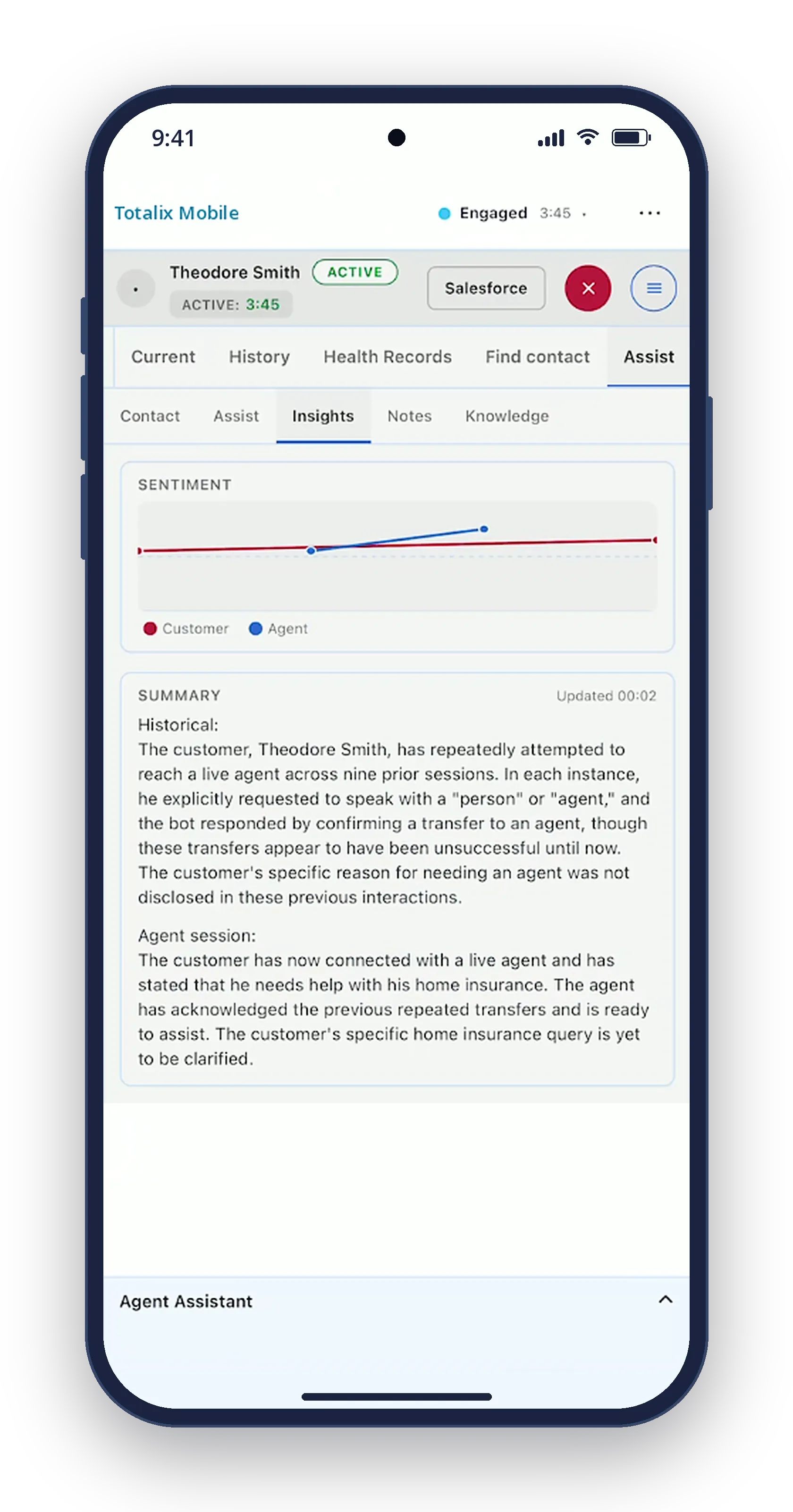
The agent workspace on a phone: the same tasks, conversations and AI assistance as the desktop.
See Totalix Mobile on your use case, in your CRM, deployed your way.
What’s in it
Everything in Totalix Mobile.
53 capabilities, available to early adopters from November 2026 and generally available from 1 December 2026.
Available
1 December 2026
Early adopters from November 2026
Every channel
Voice and every digital channel in one agent workspace and one conversation timeline.
- Voice Calls handled in the same workspace as every digital channel.At launch
- Chat Live chat with customers, in the same conversation timeline as every other channel.At launch
- Email Customer email, worked in the same workspace and timeline as every other channel.At launch
- Video Move to a video conversation when the issue needs to be seen, not described.At launch
- SMS, MMS, WhatsApp and Facebook Messenger Messaging on the channels your customers already use.At launch
Contacts and conversation history
Know who the customer is and everything that has already happened, on every channel.
- Contact display Who the customer is, on screen as the conversation arrives.At launch
- Contact selector Find and attach the right contact to any conversation.At launch
- Contact-reason tagging Tag every interaction with why the customer got in touch.At launch
- Conversation timeline Every interaction on every channel in one timeline per customer.At launch
- Cases Group related interactions into a case and follow it through to resolution.Jan 2027
AI in every conversation
UWXP, the Upstream Works AI experience layer, runs natively inside every edition.
- Voice transcription Calls transcribed to text alongside the conversation.At launch
- Real-time translation Automatic translation inside the conversation, so agent and customer can each use their own language.At launch
- Agentic omnichannel bots (UWXP) AI agents that resolve requests across channels and hand over to a person with full context.At launch
- Agent Assist (UWXP) Suggested replies, live sentiment and conversation summaries beside every interaction.At launch
Agent productivity
A workspace each team can shape, in their own language, with the answers one click away.
- Templates and knowledge Approved responses and knowledge, one click from the conversation.At launch
- Media library Shared images, documents and files, ready to send.At launch
- Configurable, responsive desktop Lay the workspace out for each role; it adapts to any screen size.At launch
- Personal and shared address books Each agent’s own contacts, plus directories the whole team shares.At launch
- Localized in 37+ languages The workspace in more than 37 languages.At launch
- Left-to-right and right-to-left Full support for right-to-left languages as well as left-to-right.At launch
- Theming Match the workspace to your brand.At launch
- GDPR and WCAG by design Privacy and accessibility built in from the first release.At launch
Supervisor tools
See every queue and every agent live, and step in the moment it matters.
- Digital monitoring, silent monitoring and barge-in Follow live digital conversations, coach without being seen, and step in when needed.At launch
- Voice monitoring, silent monitoring and barge-in Listen to live calls, coach without being heard, and join the call when needed.At launch
- Team views and agent state control See every agent’s state at a glance and change it from one view.At launch
- Queue viewer with reskilling Watch queues live and move agents’ skills to meet demand.At launch
- Supervisor alerts Alerts that tell supervisors when something needs attention.At launch
Dashboards and reporting
Real-time and historical views for agents and supervisors, plus usage reports ready for billing.
- Agent real-time dashboard Each agent’s own performance, live.At launch
- Supervisor dashboards (UW Insights) Real-time and historical dashboards powered by UW Insights.At launch
- Contact-reason reports Why customers contact you, from the tags agents apply.At launch
- Digital usage reports Digital-channel usage, reported for billing.At launch
- Voice usage reports Voice usage, reported for billing.At launch
- Agent and skill activity reports What each agent and each skill handled.At launch
- Agent sign-in and productivity reports Sign-in and sign-out, tasks processed and more.At launch
Browser and mobile
The full workspace in a web browser, and native on mobile for agents and for your customers.
- Native mobile app For agents away from a desk, and for your customers inside your own apps.At launch
- Runs in the browser The full agent workspace in a web browser.At launch
Integrations
Bring your own systems and data into the conversation.
- Data chips Customer data from your business systems, surfaced in the conversation.At launch
- Screen pops The right record opens as the contact arrives.At launch
- Gadgets Add your own tools as panels in the workspace.At launch
- Custom functions Extend the workspace with your own actions.At launch
Queuing and routing
Built-in queuing and routing in Totalix Complete, Embedded and Mobile.
- Queues and overflows Queues with overflow, so no contact waits longer than it should.At launch
- Advanced attribute-based routing Match each contact to the right agent by the attributes that matter to you.At launch
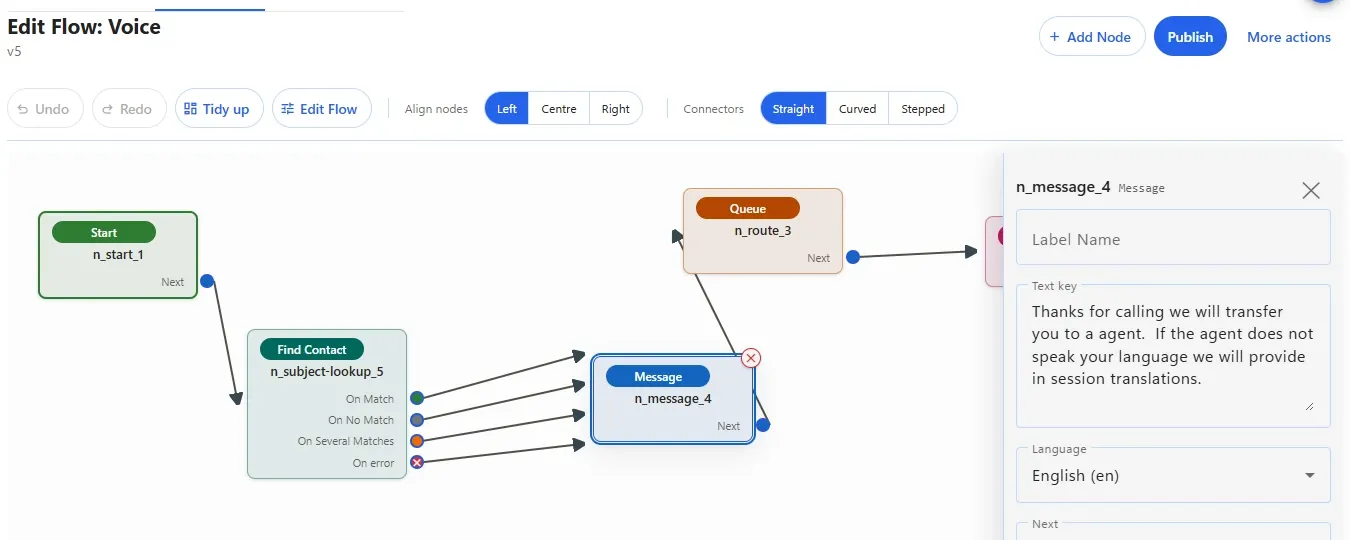
- Scripted flows Design routing and self-service flows visually.At launch
- Callback from queue Customers can ask for a call back instead of waiting on hold.At launch
- Critical call support Priority handling for urgent, high-stakes calls.At launch
- Visual queue for voice See waiting calls and pick the right one.At launch
- Visual queue for digital channels See waiting digital conversations and pick the right one.At launch
- Multi-agent task offering Offer a task to several agents at once.At launch
- Sequenced calling Ring people in a defined order.At launch
Administration and governance
Every change controlled, permissioned and recorded.
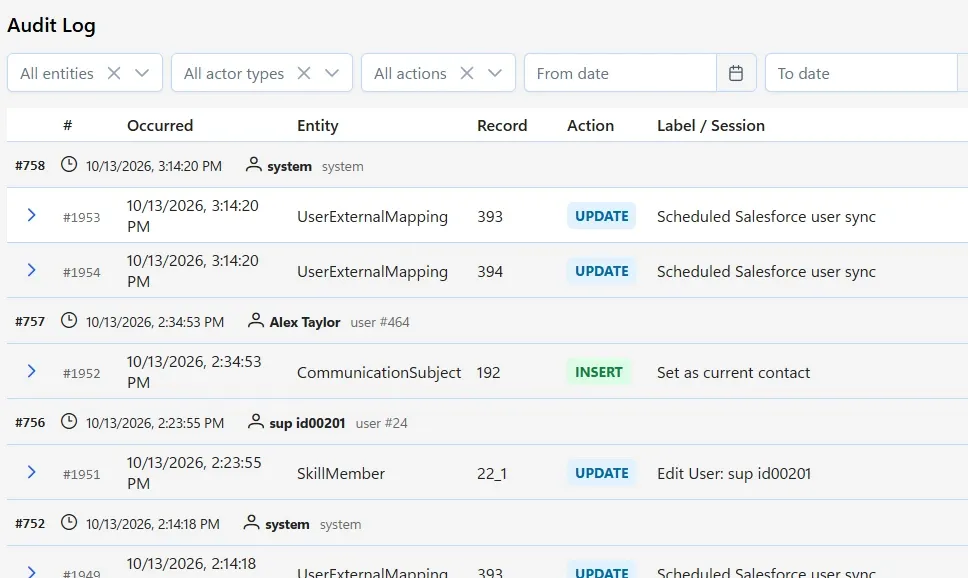
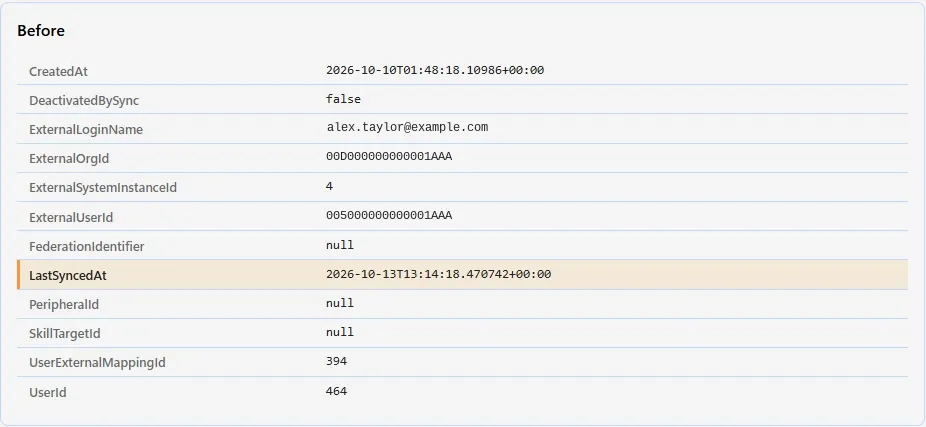
- Audit log of every configuration change Who changed what, and when.At launch
- Admin console on tablet or browser Administer the platform from a browser or a tablet.At launch
- Configurable roles and access control Decide exactly who can see and change what.At launch
PBX features
Telephony features for the people who need more than a contact center.
- PBX extensions Extension numbers for your people.Jan 2027
Compare all five editions At launch = early adopters from November 2026; general availability 1 December 2026.
Run it yourself.
Changing how it runs no longer means a specialist, a service ticket and a wait. Your own team configures the workspace, and every change is recorded in the audit log.
A live tenant, not a slide deck, with the engineer who knows your platform.
In every edition from the first release.
- Every channel — chat, SMS, WhatsApp, Facebook, email, voice and video
- Real-time translation across every channel
- One conversation timeline, contact display and contact selector
- Self-service and assist — UWXP bots plus Agent Assist and knowledge
- Supervisor tools — agent state, silent monitoring, queues and alerting
- Reporting by agent, skill and contact reason
- Integrations — screen pops, data chips, gadgets and custom functions
- 37+ languages, left-to-right and right-to-left, with theming to match your brand
- Governance — configurable roles and access control, and an audit log of every configuration change
- New cloud tenant live in minutes, with GDPR and WCAG built in
Works with the systems your frontline already uses




Compare every feature, edition by edition →
Other editions: Complete · for Cisco · for Amazon Connect (Jan 2027) · Embedded
Choose how you deploy it.
Every edition runs on your choice of deployment model — the page stays the same. What each model means →
Edition
Deployment
Not sure yet? Request a demo and we’ll show you the edition that matches how you run today — or join the waitlist and choose with your onboarding contact.
Totalix Mobile Flagship
The agent workspace on a phone for mobile, field and remote teams — plus a Mobile SDK that puts chat, messaging and video inside your own customer apps.
Best for: mobile contact center agents, field service teams and remote relationship managers — and any customer-facing app that should offer chat, messaging or video.
Request a demo — Totalix MobileQuestions about Totalix Mobile.
Who is Totalix Mobile for?
Two groups. On your side: mobile contact center agents, field service technicians, branch and store staff, clinicians, drivers and remote relationship managers — anyone who serves customers away from a desk. On the customer side: the users of your own mobile apps, who get chat, messaging and video from the platform through the Mobile SDK.
What does the Totalix Mobile SDK do?
The Totalix Mobile SDK lets you add chat, messaging, video and other platform engagement features to your own customer-facing iOS and Android apps, and to the internal apps your frontline already carries. Conversations started in your app land in the same timeline as every other channel.
Does it share context with the contact center?
Yes. The conversation timeline, verified contacts and knowledge are the same across desktop, mobile and the SDK, so a customer helped in the field or in your app is recognized when they call.
When is Totalix Mobile available?
Totalix Mobile is available to early adopters from November 2026 and generally available from 1 December 2026. The full list of capabilities, and when each one arrives, is on the Totalix feature comparison.
What is the Totalix YOUR program?
The YOUR program lets Totalix customers shape what Totalix does next. Every customer on a three-year agreement can put forward one feature request a year. Within the program’s scope, Upstream Works commits it to the Totalix roadmap and builds it, for free.
Request a demo
See how Totalix™ fits the platform you already use.
Tell us who you are and what you run. We’ll show you Totalix Mobile on your use case, in your CRM, deployed your way.
- A live tenant, not a slide deck
- The engineer who knows your platform
- Or connect with one of our 50+ partners
Want your own Totalix trial tenant from 1 December 2026? Join the waitlist →
Thanks — your demo request is in.
We’ll be in touch shortly to arrange your Totalix Mobile demo.
What happens next
- Your request goes straight to the Upstream Works sales lead for your region.
- We’ll contact you within one business day.
Request a demo
Our online form is having trouble right now. Please send your request by email and we’ll take it from there.
Send by email instead