Totalix™ edition
Totalix™ for Cisco
Deep-native integration with Cisco Finesse — UCCE, PCCE and WCCE — and Webex Contact Center.
Who is Totalix for Cisco for?
Totalix for Cisco is for contact centers that want to keep Cisco Finesse as the agent desktop — and can also embed in the CRM and deliver a mobile agent solution. Available from 1 December 2026 through Upstream Works partners. Deep-native integration with Cisco Finesse — UCCE, PCCE and WCCE — and Webex Contact Center. Early adopters from November 2026; generally available 1 December 2026.
- Native to Cisco Finesse — UCCE, PCCE and WCCE — and Webex Contact Center
- Keep Finesse as the agent desktop; add digital channels, AI Agent Assist, knowledge and reporting without replacing the Cisco estate
- Embed the same experience in your CRM, and give field and remote staff a mobile agent solution
- Buy through Upstream Works partners
Totalix™ for Cisco is for contact centers that want to keep Cisco Finesse as the agent desktop. It integrates natively with Finesse across Unified Contact Center Enterprise (UCCE), Packaged Contact Center Enterprise (PCCE) and Webex Contact Center Enterprise (WCCE), and with Webex Contact Center — adding digital channels, AI Agent Assist, knowledge and reporting without disrupting the routing, business rules and integrations you have invested in.
Agents keep one consistent desktop as you move between Finesse and Webex Contact Center, so a platform migration no longer means retraining the floor. The same experience can also be embedded in your CRM for the teams who live there, and delivered as a mobile agent solution for field and remote staff — one Cisco estate, three ways to work in it.
Buy it through the Upstream Works partners who deliver it.
Transcripts of the Totalix for Cisco demo films (Webex Contact Center, 2:25; Cisco Finesse, 2:09)
Webex Contact Center (2:25)
Introducing Totalix for Webex Contact Center. Built around the powerful routing capabilities of Webex Contact Center, incoming interactions arrive through native Webex notifications, giving agents a familiar, joined-up experience within the Totalix desktop.
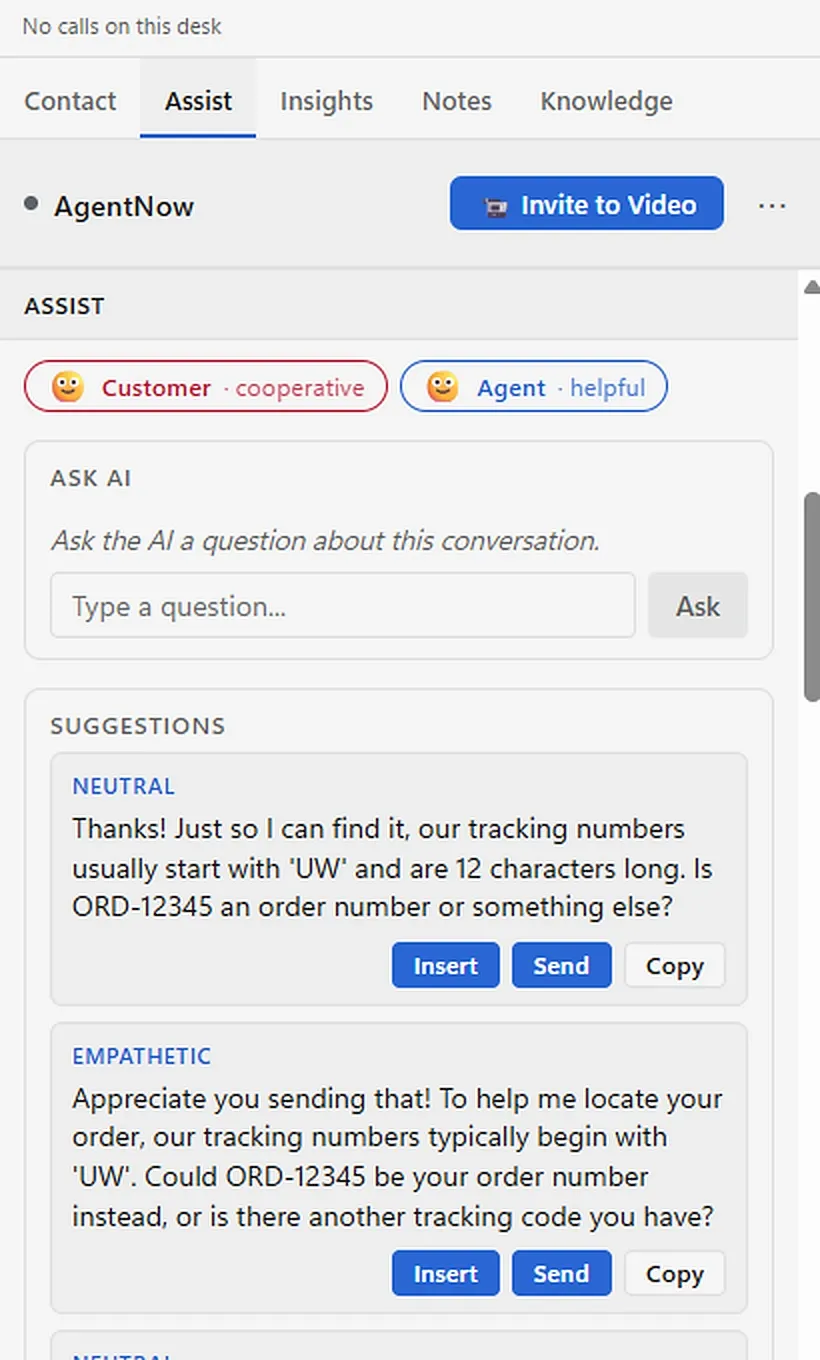
For digital conversations, intelligent, AI-powered suggested responses provide agents with relevant, context-aware guidance, helping them respond more quickly, accurately, and confidently. Agents can even choose the tone of their responses, allowing them to adapt their communication to suit the customer and the situation.
And this is where Totalix brings everything together. Rather than working across disconnected applications, agents have access to a complete omnichannel workspace, combining customer conversations, intelligent assistance, and the flexibility to move between channels as the interaction evolves. With AgentNow, agents can move seamlessly from chat to face-to-face video or audio, bringing a more personal, connected experience to every conversation.
Totalix also gives agents greater flexibility in managing their workload. With visibility of queued interactions, agents can choose a conversation and begin responding immediately, all within the same intuitive workspace without disrupting their workflow.
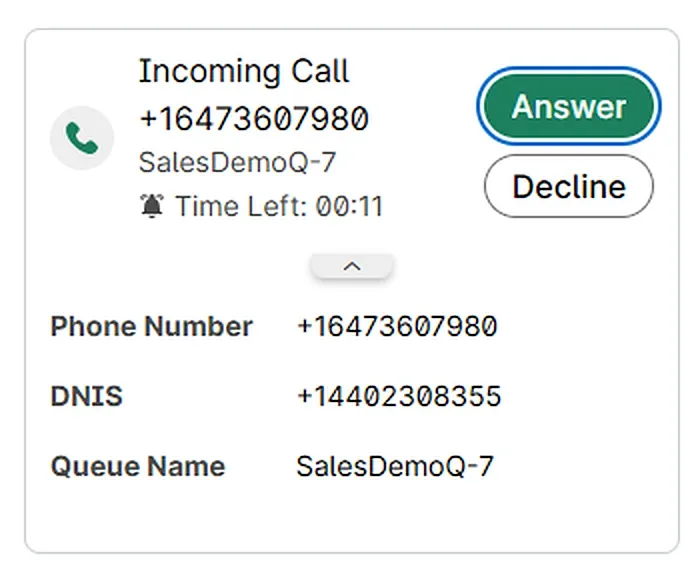
And for voice, the experience is just as seamless, with Webex Calling fully integrated into Totalix. Native WebRTC and embedded call controls keep everything agents need in one place. When additional expertise is needed, agents can transfer the conversation directly through Totalix, maintaining a smooth and connected experience.
Combining Webex routing with the complete omnichannel capabilities of Totalix. Two powerful solutions. One seamless agent experience.
Cisco Finesse (2:09)
Introducing Totalix on Cisco Finesse. Embedded within a single Finesse gadget, Totalix simplifies implementation and administration, while seamlessly integrating with Cisco MR PG — combining powerful Cisco routing with a complete omnichannel agent desktop.
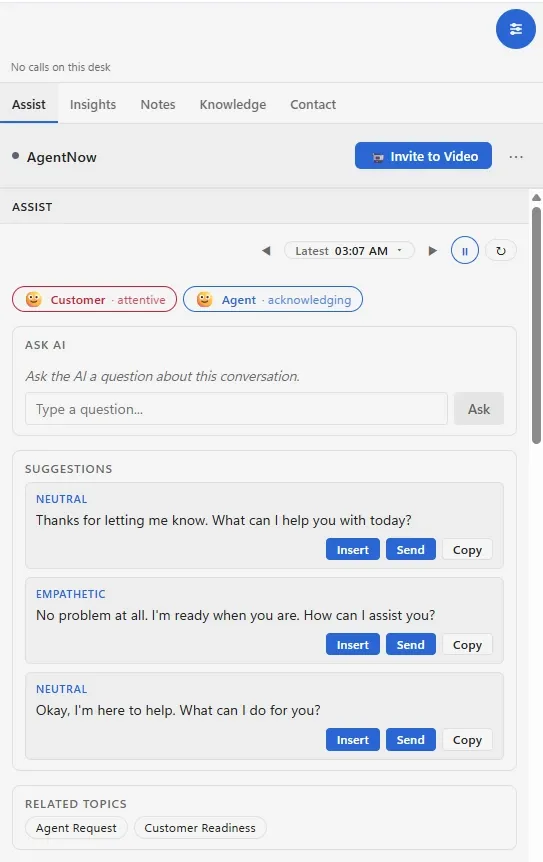
With UW Assist, agents benefit from intelligent, AI-powered suggested responses, providing relevant, context-aware guidance throughout digital conversations. Agents can choose between different response tones, helping them communicate more naturally, consistently and effectively, while reducing the effort required to respond. And it's all delivered within the familiar Cisco Finesse environment.
Rather than navigating multiple disconnected applications, agents have everything they need in one intuitive workspace — bringing together customer interactions, intelligent assistance, and the flexibility to manage conversations across multiple channels. It's a more connected experience that helps agents stay focused on the customer, not the technology.
When a conversation needs a more personal touch, AgentNow enables agents to seamlessly escalate from chat to face-to-face video or audio. By bringing richer, more engaging interactions directly into the contact center, organizations can deliver a more personalized customer experience — without disrupting the agent's workflow.
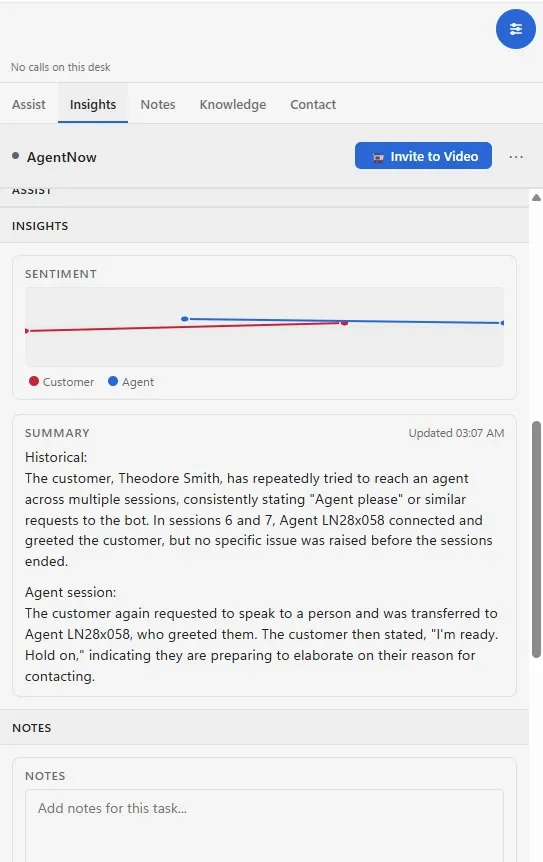
UW Assist provides intelligent conversation summaries and sentiment insights, helping agents better understand customers, while reducing manual wrap-up effort and handling time.
And the experience extends effortlessly across channels. Whether messaging, voice, digital messaging, email or video, Totalix brings everything together — combining Cisco's powerful routing engine with a complete, intelligent omnichannel experience.
Totalix™ for Cisco in Cisco Finesse.
Finesse on UCCE, PCCE and WCCE: the Totalix workspace runs inside the Finesse desktop your agents already use, with Assist and Insights beside every conversation.
Totalix™ for Cisco with Webex Contact Center.
Screens from the Totalix console on Webex Contact Center: voice and chat in one agent workspace, with AI beside every conversation.
See Totalix for Cisco on your use case, in your CRM, deployed your way.
What’s in it
Everything in Totalix for Cisco.
46 capabilities, available to early adopters from November 2026 and generally available from 1 December 2026.
Available
1 December 2026
Early adopters from November 2026
Shown separately for each Cisco platform: Cisco Finesse (left; Finesse on UCCE, PCCE and WCCE) and Webex Contact Center (right).
Every channel
Voice and every digital channel in one agent workspace and one conversation timeline.
- Voice Calls handled in the same workspace as every digital channel.FinesseVia Cisco CCEWebex CCVia Webex CC
- Chat Live chat with customers, in the same conversation timeline as every other channel.FinesseAt launchWebex CCAt launch
- Email Customer email, worked in the same workspace and timeline as every other channel.FinesseAt launchWebex CCAt launch
- Video Move to a video conversation when the issue needs to be seen, not described.FinesseAt launchWebex CCAt launch
- SMS, MMS, WhatsApp and Facebook Messenger Messaging on the channels your customers already use.FinesseAt launchWebex CCAt launch
Contacts and conversation history
Know who the customer is and everything that has already happened, on every channel.
- Contact display Who the customer is, on screen as the conversation arrives.FinesseAt launchWebex CCAt launch
- Contact selector Find and attach the right contact to any conversation.FinesseAt launchWebex CCAt launch
- Contact-reason tagging Tag every interaction with why the customer got in touch.FinesseAt launchWebex CCAt launch
- Conversation timeline Every interaction on every channel in one timeline per customer.FinesseAt launchWebex CCAt launch
- Cases Group related interactions into a case and follow it through to resolution.FinesseJan 2027Webex CCJan 2027
AI in every conversation
UWXP, the Upstream Works AI experience layer, runs natively inside every edition.
- Voice transcription Calls transcribed to text alongside the conversation.FinesseAt launchWebex CCAt launch
- Real-time translation Automatic translation inside the conversation, so agent and customer can each use their own language.FinesseAt launchWebex CCAt launch
- Agentic omnichannel bots (UWXP) AI agents that resolve requests across channels and hand over to a person with full context.FinesseAt launchWebex CCAt launch
- Agent Assist (UWXP) Suggested replies, live sentiment and conversation summaries beside every interaction.FinesseAt launchWebex CCAt launch
Agent productivity
A workspace each team can shape, in their own language, with the answers one click away.
- Templates and knowledge Approved responses and knowledge, one click from the conversation.FinesseAt launchWebex CCAt launch
- Media library Shared images, documents and files, ready to send.FinesseAt launchWebex CCAt launch
- Configurable, responsive desktop Lay the workspace out for each role; it adapts to any screen size.FinesseAt launchWebex CCAt launch
- Personal and shared address books Each agent’s own contacts, plus directories the whole team shares.FinesseAt launchWebex CCAt launch
- Localized in 37+ languages The workspace in more than 37 languages.FinesseAt launchWebex CCAt launch
- Left-to-right and right-to-left Full support for right-to-left languages as well as left-to-right.FinesseAt launchWebex CCAt launch
- Theming Match the workspace to your brand.FinesseAt launchWebex CCAt launch
- GDPR and WCAG by design Privacy and accessibility built in from the first release.FinesseAt launchWebex CCAt launch
Supervisor tools
See every queue and every agent live, and step in the moment it matters.
- Digital monitoring, silent monitoring and barge-in Follow live digital conversations, coach without being seen, and step in when needed.FinesseAt launchWebex CCAt launch
- Voice monitoring, silent monitoring and barge-in Listen to live calls, coach without being heard, and join the call when needed.FinesseVia Cisco CCEWebex CCVia Webex CC
- Team views and agent state control See every agent’s state at a glance and change it from one view.FinesseVia Cisco CCEWebex CCVia Webex CC
- Queue viewer with reskilling Watch queues live and move agents’ skills to meet demand.FinesseVia Cisco CCEWebex CCVia Webex CC
- Supervisor alerts Alerts that tell supervisors when something needs attention.FinesseAt launchWebex CCAt launch
Dashboards and reporting
Real-time and historical views for agents and supervisors, plus usage reports ready for billing.
- Agent real-time dashboard Each agent’s own performance, live.FinesseAt launchWebex CCAt launch
- Supervisor dashboards (UW Insights) Real-time and historical dashboards powered by UW Insights.FinesseAt launchWebex CCAt launch
- Contact-reason reports Why customers contact you, from the tags agents apply.FinesseAt launchWebex CCAt launch
- Digital usage reports Digital-channel usage, reported for billing.FinesseAt launchWebex CCAt launch
- Voice usage reports Voice usage, reported for billing.FinesseVia Cisco CCEWebex CCVia Webex CC
- Agent and skill activity reports What each agent and each skill handled.FinesseVia Cisco CCEWebex CCVia Webex CC
- Agent sign-in and productivity reports Sign-in and sign-out, tasks processed and more.FinesseVia Cisco CCEWebex CCVia Webex CC
Inside the agent desktop you already use
Totalix runs inside the desktop your agents already have open.
- Inside Cisco Finesse Embedded in Finesse for Cisco contact center enterprise agents.FinesseAt launchWebex CCNot offered
- Inside Webex Contact Center Embedded for Webex Contact Center agents.FinesseNot offeredWebex CCAt launch
Integrations
Bring your own systems and data into the conversation.
- Data chips Customer data from your business systems, surfaced in the conversation.FinesseAt launchWebex CCAt launch
- Screen pops The right record opens as the contact arrives.FinesseAt launchWebex CCAt launch
- Gadgets Add your own tools as panels in the workspace.FinesseAt launchWebex CCAt launch
- Custom functions Extend the workspace with your own actions.FinesseAt launchWebex CCAt launch
Queuing and routing
Built-in queuing and routing in Totalix Complete, Embedded and Mobile.
- Visual queue for digital channels See waiting digital conversations and pick the right one.FinesseAt launchWebex CCAt launch
Your platform’s routing, kept
On Cisco and Amazon Connect, the routing you have already invested in stays in charge.
- Cisco contact center enterprise routing Your UCCE, PCCE or Webex CCE routing and business rules stay in place.FinesseVia Cisco CCEWebex CCNot offered
- Webex Contact Center routing Your Webex Contact Center routing stays in place.FinesseNot offeredWebex CCVia Webex CC
Administration and governance
Every change controlled, permissioned and recorded.
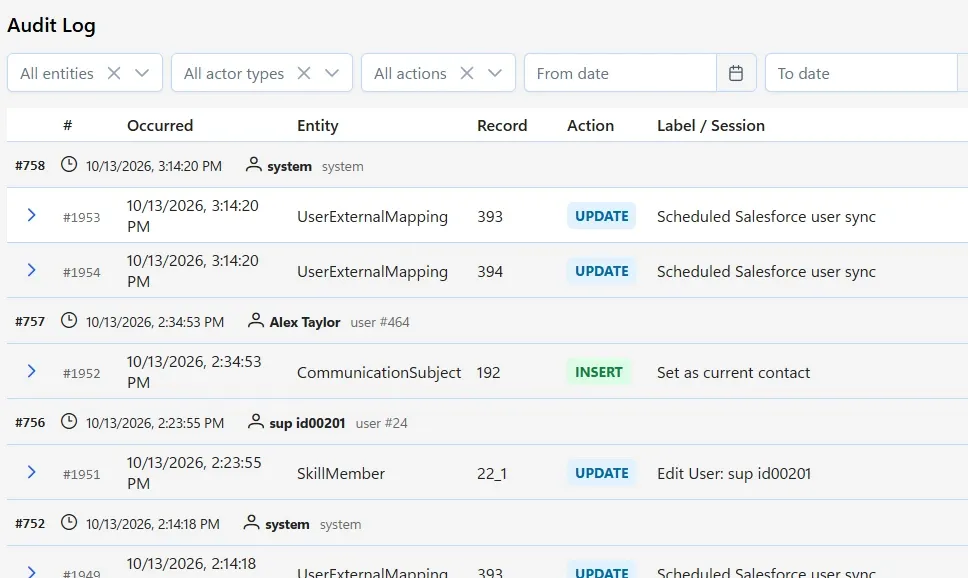
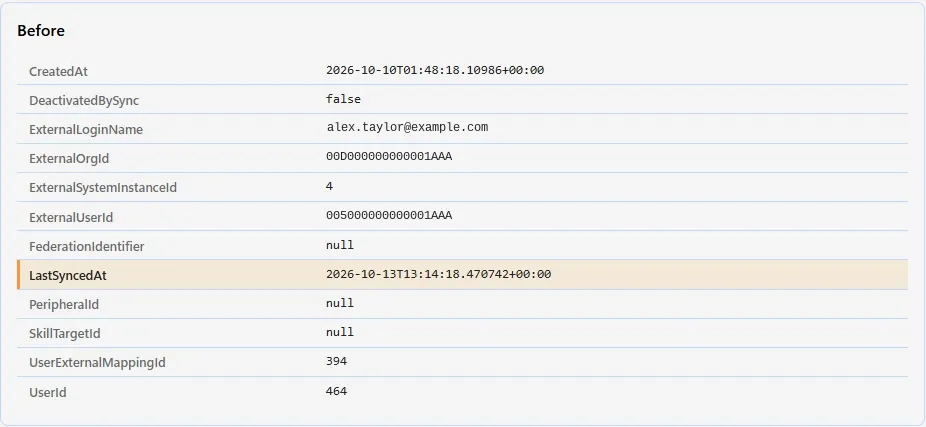
- Audit log of every configuration change Who changed what, and when.FinesseAt launchWebex CCAt launch
- Admin console on tablet or browser Administer the platform from a browser or a tablet.FinesseAt launchWebex CCAt launch
- Configurable roles and access control Decide exactly who can see and change what.FinesseAt launchWebex CCAt launch
Compare all five editions At launch = early adopters from November 2026; general availability 1 December 2026.
Run it yourself.
Changing how it runs no longer means a specialist, a service ticket and a wait. Your own team configures the workspace, and every change is recorded in the audit log.
A live tenant, not a slide deck, with the engineer who knows your platform.
In every edition from the first release.
- Every channel — chat, SMS, WhatsApp, Facebook, email, voice and video
- Real-time translation across every channel
- One conversation timeline, contact display and contact selector
- Self-service and assist — UWXP bots plus Agent Assist and knowledge
- Supervisor tools — agent state, silent monitoring, queues and alerting
- Reporting by agent, skill and contact reason
- Integrations — screen pops, data chips, gadgets and custom functions
- 37+ languages, left-to-right and right-to-left, with theming to match your brand
- Governance — configurable roles and access control, and an audit log of every configuration change
- New cloud tenant live in minutes, with GDPR and WCAG built in
Cisco and the partners who deliver it
All Cisco specialist partners →

















Compare every feature, edition by edition →
Other editions: Complete · for Amazon Connect (Jan 2027) · Embedded · Mobile
Choose how you deploy it.
Every edition runs on your choice of deployment model — the page stays the same. What each model means →
Edition
Deployment
Not sure yet? Request a demo and we’ll show you the edition that matches how you run today — or join the waitlist and choose with your onboarding contact.
Totalix for Cisco Flagship
Deep-native integration with Cisco Finesse — UCCE, PCCE and WCCE — and Webex Contact Center.
Best for: contact centers that want to keep Cisco Finesse as the agent desktop — and can also embed in the CRM and deliver a mobile agent solution. Available from 1 December 2026 through Upstream Works partners.
Request a demo — Totalix for CiscoQuestions about Totalix for Cisco.
Which Cisco platforms does Totalix for Cisco support?
Cisco Finesse on Unified Contact Center Enterprise (UCCE), Packaged Contact Center Enterprise (PCCE) and Webex Contact Center Enterprise (WCCE), plus Webex Contact Center. The agent desktop stays consistent across all of them, which is what makes a migration between them painless.
Can Totalix for Cisco be embedded in our CRM, or used on mobile?
Yes to both. The Cisco edition keeps Finesse as the agent desktop, and the same experience can be embedded in your CRM for the teams who work there, or delivered as a mobile agent solution for field and remote staff.
Do we have to replace our Cisco estate?
No. Totalix™ for Cisco is additive: it keeps Cisco routing, business rules and integrations in place and adds the modern agent experience, digital channels, AI and CRM embedding on top.
How do we buy Totalix for Cisco?
Through the Upstream Works partners who deliver it worldwide. Request a demo and we will connect you with the right one.
Can the Cisco edition run in the cloud?
Yes. Deployment is a choice on every edition: SaaS, Dedicated Hosted, Partner Hosted, or On-Premise from January 2027 — the same four models, all on the same code base. The deployment models page explains each one.
Can Totalix for Cisco run on-premise for a bank?
Yes. Totalix for Cisco On-Premise arrives in January 2027, and the current Upstream Works release already runs omnichannel, AgentNow video, UW Knowledge & Assist and UWXP AI on-premise inside Finesse, for banks that keep customer data in their own data center, such as those under Central Bank of Egypt or SAMA rules.
When is Totalix for Cisco available?
Totalix for Cisco is available to early adopters from November 2026 and generally available from 1 December 2026. The full list of capabilities, and when each one arrives, is on the Totalix feature comparison.
What is the Totalix YOUR program?
The YOUR program lets Totalix customers shape what Totalix does next. Every customer on a three-year agreement can put forward one feature request a year. Within the program’s scope, Upstream Works commits it to the Totalix roadmap and builds it, for free.
Request a demo
See how Totalix™ fits the platform you already use.
Tell us who you are and what you run. We’ll show you Totalix for Cisco on your use case, in your CRM, deployed your way.
- A live tenant, not a slide deck
- The engineer who knows your platform
- Or connect with one of our 50+ partners
Want your own Totalix trial tenant from 1 December 2026? Join the waitlist →
Thanks — your demo request is in.
We’ll be in touch shortly to arrange your Totalix for Cisco demo.
What happens next
- Your request goes straight to the Upstream Works sales lead for your region.
- We’ll contact you within one business day.
Request a demo
Our online form is having trouble right now. Please send your request by email and we’ll take it from there.
Send by email instead